Chapter 6: Backend and collaboration
Until now the editor kept its data in the page. Meeting notes belong to a team, so this chapter moves them behind a server and lets several people edit one document. Two pieces cooperate: the Nuxt module (routes, Hocuspocus websocket server, rate limiting) and the EditorPorts you give it (who the user is, where documents live). On the client, collaboration is a feature, not a mode.
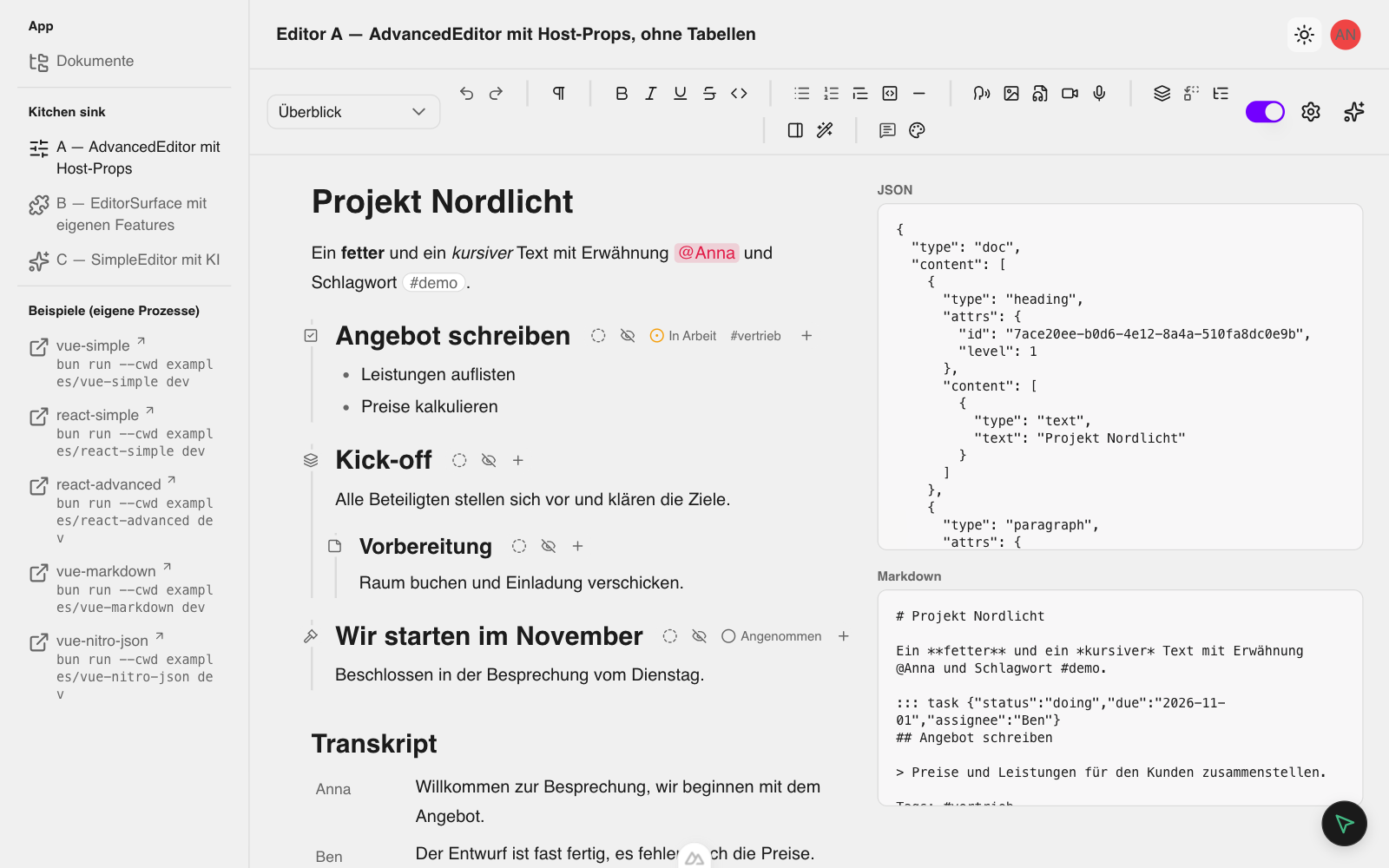
This chapter has no live demo: it needs a server. The repository's Nuxt app is the runnable reference. Start it with bun run dev (port 3056); it needs NUXT_SESSION_PASSWORD (at least 32 characters, for the session cookie) in .env. The app has no login: a visitor acts as one of the demo users anna, ben and bernd and switches in the user menu top right. Open /kitchen-sink/advanced for the advanced editor on a sample document:
Register the Nuxt module
The module goes into nuxt.config.ts after @nuxt/ui, because it patches Nuxt UI's generated stylesheet. The repository's own config registers it by path, so that editing the library needs no build step; in your app the entry is @skaile/forge-editor/nuxt:
  extends: ['nuxt-layer-annotation-inbox'],
  compatibilityDate: '2026-09-01',
  devtools: { enabled: true },
  devServer: { port: 3056 }, // assigned by dev-server skill (~/.skills/devskill/ports.tsv)
  ssr: false, // TipTap is client-only
  // Nuxt does not honour custom export conditions when it resolves a module name, so the source module is loaded by path.
  modules: ['@nuxt/ui', '@skaile/forge-chat/nuxt', 'nuxt-auth-utils', './packages/editor/src/nuxt/module.ts'],
  ui: { fonts: false },
  // `EDITOR_LOCALE=en` renders the editor chrome in English (default: German). Speech-to-text (“Create readable rendition” on
  // audio/video) runs on Deepgram only when `NUXT_TIPTAP_EDITOR_AI_TRANSCRIPTION_API_KEY` is set (the key itself is read at runtime).
The module registers one client plugin, which installs the editor context (createEditor) with account-synced settings and the public AI configuration; the context then talks to the module's HTTP routes. It auto-registers no component or composable: import everything from the package entries. Nuxt module has the details, and Quick start: Nuxt has the full setup including the minimal in-memory ports.
Give it EditorPorts
The package owns the routes, the websocket server, rate limiting and the wire formats. You own identity (sessions, sign-in, which user may open which document) and storage (where documents, Yjs state, assets, settings and themes live). Both enter through one object, EditorPorts, which you provide in a Nitro plugin with provideEditorServer({ ports }). The package never reads cookies or touches files itself: authenticate returns the user or null, and the storage methods persist what they are given. The repository's plugin wires the ports to session cookies and the file system:
import type { User } from '#auth-utils'
import { createJsonAdapter } from '@skaile/forge-editor/adapters/json'
import { provideEditorServer } from '@skaile/forge-editor/server/nitro'
import { createWorkspaceTools } from '@skaile/forge-editor/server'

// Connects the editor package's Nuxt integration to this app's sessions, JSON document store and per-user settings.
// Synchronous on purpose: Nitro does not await a plugin, so registering after an `await` would leave the first requests without an editor server.
export default defineNitroPlugin(() => {
  // The add-ons' ports (render targets, speech, knowledge graph) and Block types; each add-on is on behind its flag, `runtimeConfig.public.addons.<name>` (`server/utils/addons.ts`).
  const addons = createAddonServer({ storeAsset, loadAsset }, addonFlagsOf(useRuntimeConfig().public.addons))
  provideEditorServer({
    ports: {
      identity: {
        // Without a session cookie h3 throws ("Cannot initialize a new session") outside a main handler.
        authenticate: request => getUserSession({ headers: request.headers, context: {} }).then(s => s.user ?? null, () => null),
      },
      documents: {
        loadContent: async id => (await getDocument(id))?.content ?? null,
        async storeContent(id, content) {
          const existing = await getDocument(id)
          if (!existing) return // deleted while a store was pending
          await putDocument({ ...existing, content, updatedAt: new Date().toISOString() })
        },
        listContents: async () => (await listAllDocuments()).map(({ id, content }) => ({ id, content })),
        // Document management over the package store: folders, create, move, delete (`/api/editor/{documents,tree}`).
        listDocumentIds: async () => indexedIds(),
        listTree,
        async createDocument(input) {
          const { id, title, updatedAt } = await createDocument(input)
          return { id, title, updatedAt, folder: input.folder ?? '' }
        },
        moveDocument,
        deleteDocument: removeDocument,
      },
      directory: { listUsers: async () => (await listUsers()).map(toSessionUser) },
      collabState: { loadState, storeState, removeState },
      assets: { storeAsset, loadAsset },
      // `user` is what `authenticate` returned: the session user.
      settings: {
        loadSettings: user => getUserSettings((user as User).id),
        storeSettings: (user, settings) => putUserSettings((user as User).id, settings),
      },
      themes: { listThemes, loadTheme, storeTheme, removeTheme },
      // Block index (`index` capability): a projection of the documents above, rebuilt on start and kept current by the editor server; in memory (memory adapter, PGlite with `NUXT_BLOCK_INDEX=pglite`, or PGlite with trigram search and vectors with `NUXT_BLOCK_INDEX=pg-vector`), so nothing to migrate.
      index: createHostBlockIndex(addons.ports.embeddings, addons.embeddingsError),
      // Prüfung records (`pruefung` capability): the editor's JSON store on `<documents dir>/.pruefung.json`, a dot-named file the document store never lists.
      pruefung: createJsonAdapter({ dir: storeRoot() }).pruefung,
      // Change sets of the document chat (`changeSets` capability): what the model proposed for other Documents, decided per Document; `<documents dir>/.change-sets.json`, likewise dot-named.
      changeSets: createJsonAdapter({ dir: storeRoot() }).changeSets,
      // Demo of the model port (`DEMO_STUB_MODEL=1`): the stub answers `{ preset: 'stub' }`; `null` for anything else falls through to the environment presets.
      models: {
        languageModel: async ref => stubModelEnabled() && 'preset' in ref && ref.preset === STUB_MODEL_ID ? stubLanguageModel : null,
        listModels: async () => stubModelEnabled() ? [...publicEnvPresets(), stubModelProfile] : null,
      },
      ...addons.ports,
    },
    ...(addons.blockTypes && { blockTypes: addons.blockTypes }),
    // The document chat's read-only workspace tools (`find_blocks`, `read_block`): the model finds and reads Blocks of the user's other Documents through the block index above.
    tools: createWorkspaceTools(addons.blockTypes && { blockTypes: addons.blockTypes }),
  })
})
You implement only the ports your product needs. A route whose port you did not register is not mounted (the path answers 404), and the client's probe omits the features that depend on it. EditorPorts lists every port, Routes and auth the routes and how each authenticates, and Storage adapters the ready-made bundles (createJsonAdapter, createDrizzleAdapter, createForgeAdapter) that save you from writing documents yourself.
Open a collaborative document
The preset contains collabFeature(), and the surface gets a session through the collaboration prop: a Yjs document, a Hocuspocus provider and the current user. The Yjs document is the document, so there is no v-model. The repository's document page creates the session once per document:
const commentsOpen = useState('tiptap-editor-comments', () => false)
// The editor's scroll container: CommentsMargin aligns its cards with the commented text inside it.
const scrollEl = useTemplateRef<HTMLElement>('scrollEl')

// Demo of the opt-in `pruefung` feature: the built-in Block types plus „Prüfabschnitt“ (`shared/utils/host-block-types.ts`); the user
// holds `pruefung.record` (not part of ROOT_ABILITIES).
// The optional add-ons (flags `runtimeConfig.public.addons`, `app/editor/addons.ts`) add their Block types (slides, quotes) and features, loaded here
// before the editor mounts and only for the flags that are on; Explore is always on.
const { t, locale } = useEditorI18n()
const exploreTarget = useExploreTarget()
// Choosing a Block in the Explore panel opens it like an embed's source; „Verknüpfungen anzeigen“ shows the panel in the sidebar.
const addons = await loadAddons({
  addons: addonFlagsOf(useRuntimeConfig().public.addons),
and hands it to AdvancedEditor, the ready-made composition of every catalog feature (media, transcript, Typed blocks, mentions, authors, comments, collab, block UI, themes and, optionally, AI):
              >
                {{ titleError }}
              </p>
            </div>
            <AdvancedEditor
              v-model:sidebar-open="sidebarOpen"
              v-model:comments-open="commentsOpen"
              :document-id="id"
              :collaboration="{ ydoc, provider, user: { id: user.id, name: user.username, color: user.color } }"
              :block-types="blockTypes"
With your own preset the same wiring reads <EditorSurface :preset="preset" :collaboration="{ ydoc, provider, user }" /> over a defineEditor list that contains collabFeature() (from @skaile/forge-editor/collab/vue). What to know about the session:
- Undo is per client. Core turns its own undo history off; the Collaboration extension brings a per-client undo and redo (
Mod-z,Mod-y,Shift-Mod-z), so undo never reverts another user's edits. - Carets.
provideradds remote carets labelled withuser; without a provider the Yjs document is edited locally only.useris anAuthorIdentity({ id, name, color }, your stable user id). The optionalauthorsandcommentsfeatures attribute text and comments to it. - Fixed at mount. Remount with a new
keywhen the document changes, so Yjs document, provider and editor never bleed between documents. - Setup errors. Supplying
collaborationto a preset withoutcollabFeature()throws „collaborationneeds a preset with the collaboration feature“. Without acollaborationprop the feature adds no extension and the editor behaves like a standalone one with a JSONv-model. - CSS. Include
@skaile/forge-editor/styles/collab.css(the Nuxt module adds it) for the caret styles.
To try it: open the same document URL in a second browser tab, or as another user in a private window (switch to ben in the user menu). Text and carets appear in both within a moment, and the header badge reads „Synchronisiert“. Collaboration covers authors, comments and positions that survive concurrent edits.
Teach the server your block
A Yjs document is valid only if every participant knows the same schema. The standalone editors of chapters 4 and 5 use a JSON v-model and need nothing here. With a collaboration session the server must know the callout, too:
- The module's collab route builds its schema from the advanced entry plus the
schemaoption you give the server:provideEditorServer({ ports, schema: () => [...advancedSchemaExtensions(), Callout] })(the option also exists oncreateCollabServerandinstallEditorServer; the default isadvancedSchemaExtensions()). Without it, a document that contains acalloutis outside what that route can load: seeding from JSON and the load-time block-ID backfill both go through a schema without the node. - Pass the Vue-free node file,
Calloutfromcallout/node.ts, neverCalloutBlock, so no Vue component loads on the server. This is why chapter 4 split the node into two files. - A plain Vue or React app with its own Hocuspocus server builds the schema itself:
getSchema([...advancedSchemaExtensions(), Callout]), with the same Collaborationfieldas the client (default). editorBlock: trueworks on the server too:assignBlockIdsreads the flag from the schema, so the server backfills IDs for callouts exactly like for paragraphs.- The client mounts a preset that contributes the same node:
advancedEditor().featurespluscalloutFeature(), together withcollabFeature()'s session, whichadvancedEditor()already has.
Advanced schema shows the Vue-free schema entries, and Production the build and the process-wide registry.
What you have now
A server side for the editor: the Nuxt module with ports for identity and storage, a collaboration session that two browsers share, and a callout the server can load. You also know where to look when a route is missing (the port is not registered) or a document will not load (the server schema lacks a node).
Next
Chapter 7: AI teaches the editor, and through aiContext the model, about callouts.
Chapter 5: Your own feature, path B
Turn the callout into an EditorFeature with a toolbar button, a hover menu for the tone, „Umwandeln in …“ and its own ability.
Chapter 7: AI
Add aiFeature() to the meeting-notes editor, provide the /api/ai endpoints and keys, and describe the callout to the model with aiContext.